Confidence ribbon
Show estimation uncertainty across a sequence.
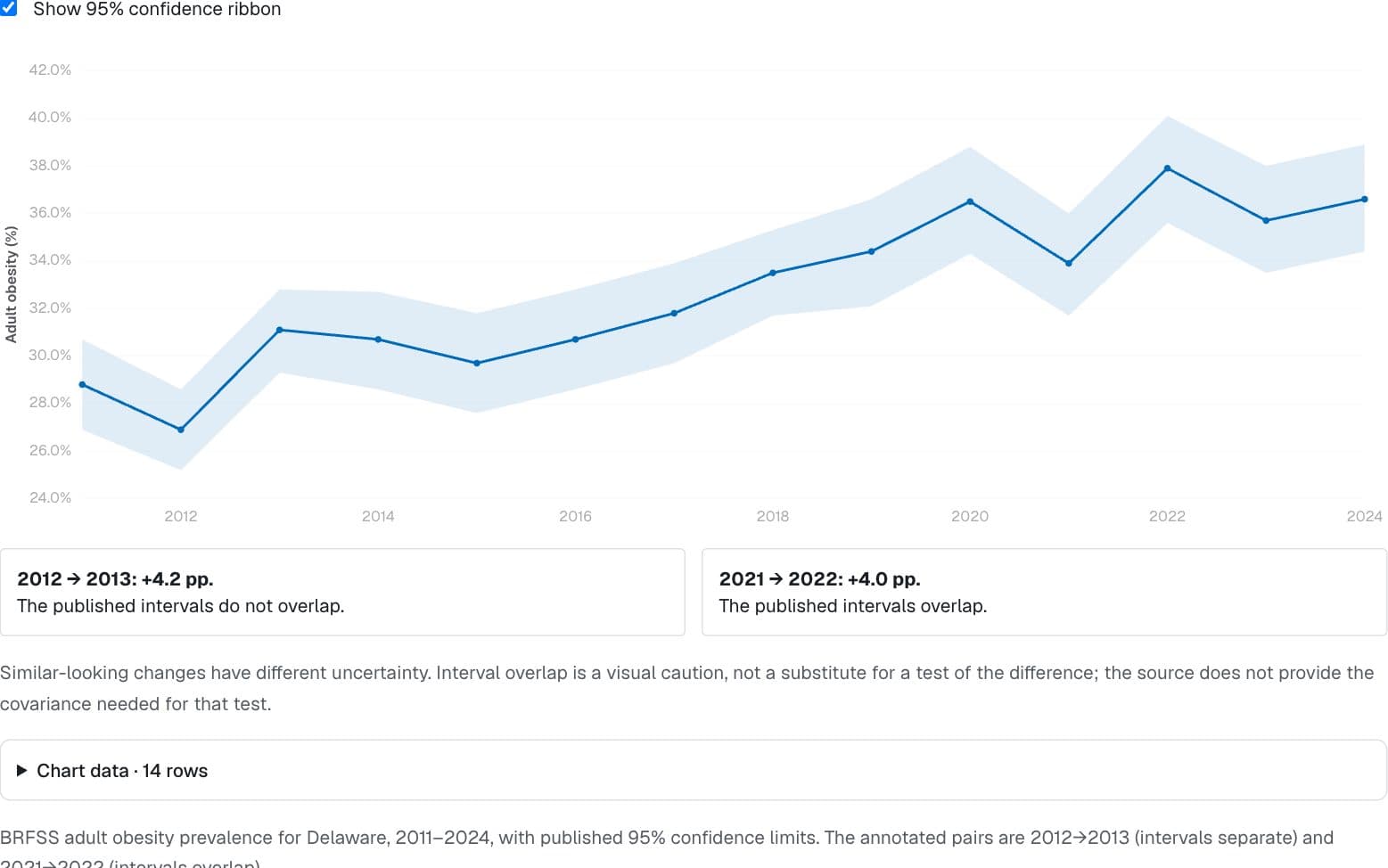
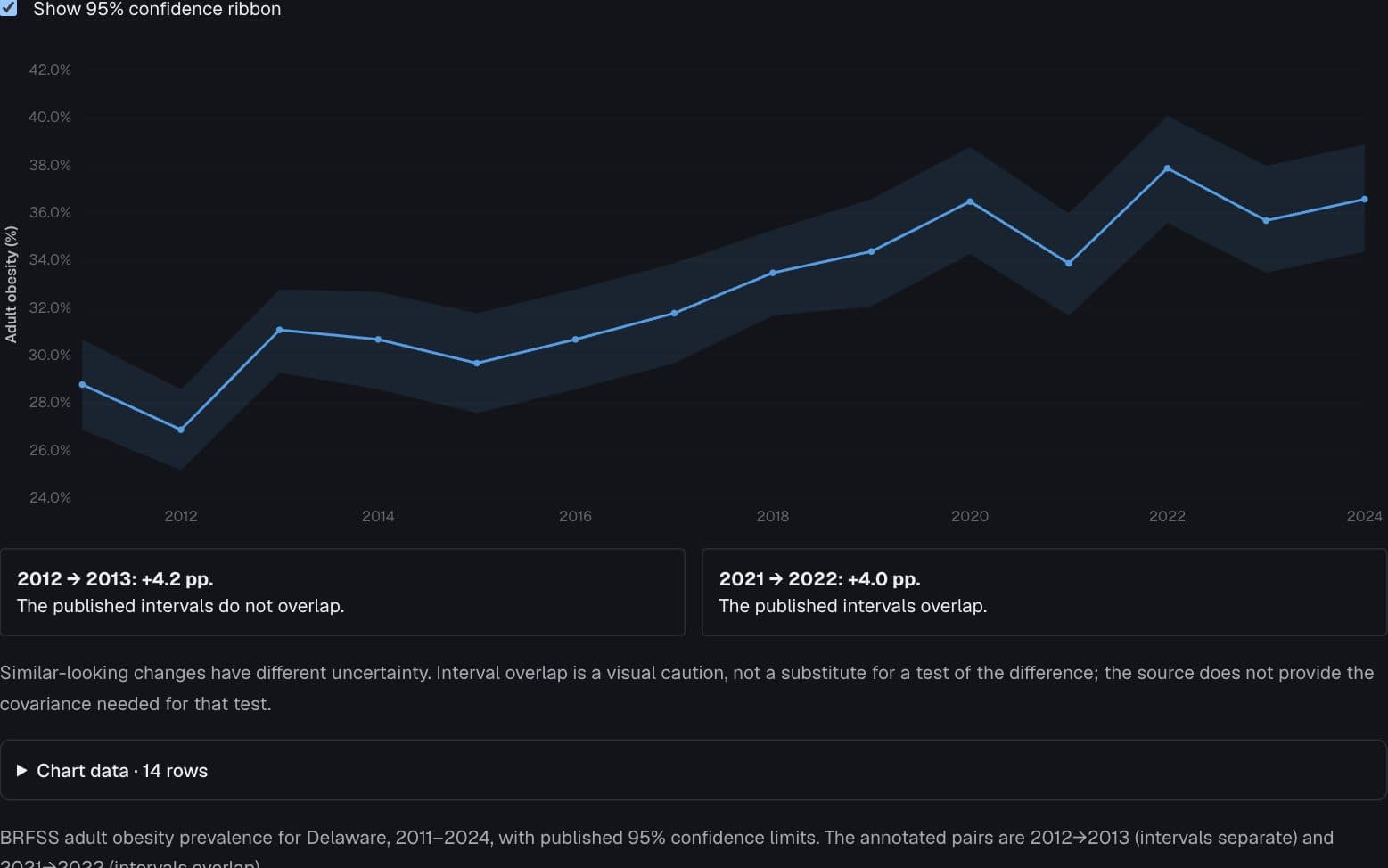
2012 → 2013: +4.2 pp.
The published intervals do not overlap.
2021 → 2022: +4.0 pp.
The published intervals overlap.
Similar-looking changes have different uncertainty. Interval overlap is a visual caution, not a substitute for a test of the difference; the source does not provide the covariance needed for that test.
Chart data · 14 rows
| Year | Estimate (%) | Lower 95% | Upper 95% | Sample N |
|---|---|---|---|---|
| 2,011 | 28.8 | 26.9 | 30.7 | 1,354 |
| 2,012 | 26.9 | 25.2 | 28.6 | 1,357 |
| 2,013 | 31.1 | 29.3 | 32.8 | 1,540 |
| 2,014 | 30.7 | 28.6 | 32.7 | 1,268 |
| 2,015 | 29.7 | 27.6 | 31.8 | 1,146 |
| 2,016 | 30.7 | 28.6 | 32.8 | 1,180 |
| 2,017 | 31.8 | 29.7 | 33.9 | 1,224 |
| 2,018 | 33.5 | 31.7 | 35.3 | 1,624 |
| 2,019 | 34.4 | 32.1 | 36.6 | 1,200 |
| 2,020 | 36.5 | 34.3 | 38.8 | 1,263 |
| 2,021 | 33.9 | 31.7 | 36 | 1,164 |
| 2,022 | 37.9 | 35.6 | 40.1 | 1,318 |
| 2,023 | 35.7 | 33.5 | 38 | 1,364 |
| 2,024 | 36.6 | 34.4 | 38.9 | 1,427 |
Page 1 of 1
BRFSS adult obesity prevalence for Delaware, 2011–2024, with published 95% confidence limits. The annotated pairs are 2012→2013 (intervals separate) and 2021→2022 (intervals overlap).
CDC BRFSS Prevalence Data, 2011–present (data.cdc.gov dttw-5yxu)
Preview
How to read it
The line shows the estimate and the ribbon its supplied lower and upper confidence limits.
When to use it
Repeated estimates with comparable uncertainty definitions.
Watch out for
Hide the ribbon to compare two similar four-point changes; reveal it to see their different uncertainty. Overlap is not a test of the difference.
Data shape & units
TimeTrendChart rows: { x, y, series, lo?, hi?, n? }[], ordered by x. Bounds may be omitted and must share units with y.
Missing values
A row without both bounds breaks the band; no interval is invented. Interpolated edges between observations are visual connections, not new estimates.
Controls & accessibility
Toggle the ribbon; the tooltip reports each year's interval and n, and the table lists the source intervals.
Use the component
Install from the CTZN registry, then pass your prepared rows. Examples below illustrate the component contract.
npx shadcn add @ctzn-viz/time-trend-chart<TimeTrendChart data={points} showInterval
formatValue={{ kind: "percent", digits: 1 }}
yLabel="Obesity (%)" ariaLabel="Obesity and uncertainty" />